Showing posts with label applications. Show all posts

Friday, March 16, 2012

35 Apps That Can Make You More Productive


PCMag.Com - When it comes to getting things done, the right software can make all the difference. Whether you refer to them as apps or applications, programs, or even services, there is so much incredible software out there to make our work easier and ourselves more productive.

Highly productive individuals tend to lead blended lives. We want to be more productive in our “downtime” (a word that formerly referred to the time when machines were not functioning) and more efficient while we’re at work so that we can have more downtime.

We carry devices with us so we won’t miss any important business-related communication while we’re at home, and we bring our personal devices from home to work because we like them more than our business products—or because they’re easier to use, or for any number of other reasons. We expect all our data to be searchable, sort-able, and accessible. In terms of productivity, leading a blended life is both a problem and a solution. We’re willing to get work done off the clock to make our jobs smoother, but we may be inadvertently decentralizing information, files, and communication, which could result in decreased productivity—unless, of course, we have the right tools to help.

Of all the thousands of products we in the PCMag Labs test and review each year, productivity software is nearest and dearest to my heart. Sure, I can appreciate the inventiveness of a device or app that sets out to do something no one has ever imagined before, but productivity applications deign to solve hard problems that people already face. Some apps look toward efficiency, aiming to take an existing product, such as email, and make it easier to use so we waste less time futzing with it. Others seek to silence the noise of the net, bolster collaboration, or unite disparate data.

The 35 programs, plug-ins, and services in this list are among our favorites for helping anyone be more productive. It’s by no means a comprehensive list, but we hope it lets you explore your options among the truly necessary productivity tools, as well as introduce you to some hidden gems that you might have missed while you were busy getting things done. —Next: Office Suites, Collaborative and Desktop>>>>>>

Tuesday, February 21, 2012

For iOS – The Clear method to complete tasks


The Clear app for iOS is a simple to-do list manager that’s making waves in the iTunes App Store. Already at No. 1, the clean interface and gesture-based controls are a hit with list-obsessed users.

Clear
The simple layout doesn’t require
buttons to make and manage lists.
(Credit: Screenshot by Jason Parker/CNET)

I wrote my previous app collection about Advanced task managers on iOS, but a new app came to my attention this week that’s too good to pass up.

Clear (99 cents) is a to-do list app that lets you use simple gestures to manage your tasks with an interface that’s as intuitive as it is easy on the eyes. People seem to like this simple task manager, because it’s now No. 1 in the iTunes App Store. This app won’t take the place of Reminders or other scheduling apps that offer alarms–Clear sticks to simple list making, and it does a fine job.

The first thing I noticed about the app is the lack of interface buttons. You never hit a button called “menu” or rely on arrows to turn pages (though you will use the iPhone type pad). Instead, you navigate around this to-do list app using swipes and pinching gestures with delightful sounds as you complete each action. While looking at a list, a swipe down creates an empty list item so you can type in your next task. A swipe to the left on an item deletes it from the list.         More

Friday, November 4, 2011

6 Great Apps to Help You Manage Your Household


Can’t remember what items your family needs from the grocery store or what days the kids’ dental appointments fall on? These apps can help you keep everyone in your life on the same page.


6 Great Apps to Manage Your Household

PCWorld - Whether you’re a couple or married with children, managing the intricacies of a household–keeping up-to-date with everyone’s schedules, tracking chores, making grocery lists, and formulating travel plans–can be a handful. To help out, we’ve collected six great mobile apps (many with complementary websites) that can help you stay on top of these challenges.


Syncing Calendars

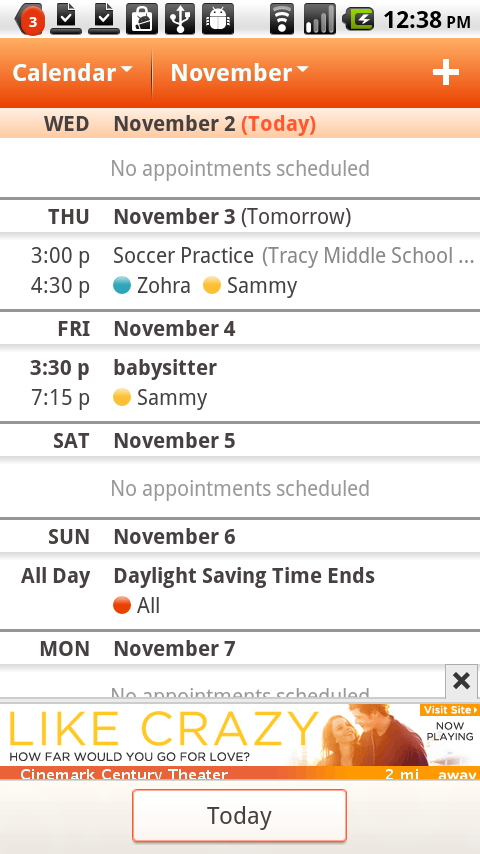
Cozi online family organizer; click for full-size image.
Cozi Calendar lets you see 
your family’s
schedule while you’re out 
and about on the road.


A free online family organizer and mobile app available for iOS, Android, and BlackBerry, Cozi provides a simple way to put everyone’s schedule on the same page. Most impressive is its calendar, which is easy to navigate and color-coded for each member of the family. That level of scheduling assistance can help ensure that Joanne gets to basketball practice on time and Jimmy doesn’t miss out on his turn to mop the kitchen floor.

Activities for the week are easy to input, and you can set them to recur regularly. You can also choose to have Cozi notify you of an event via email or text. All members of your Cozi circle–which can include grandparents, and friends–can see your calendar, so all of the key players are in the loop if you’d like to ask grandma to watch the kids for an evening, or if you want to invite your best friend to attend your daughter’s ballet recital.

If you use a calendar application other than Cozi, you can import individual Cozi circle member’s Cozi schedules into it. Conversely, you can export your Google, Apple iCal, or Outlook calendar into Cozi. In either situation, the imported calendar will be accessible as a view-only file. To enable full editing, you must download Cozi Outlook Toolbar.
The mobile version of Cozi lacks the ability to filter an individual member’s calendar (so that, for example, you access only Dad’s calendar entries); this feature is available exclusively on the Web version of the app.

Sharing Information

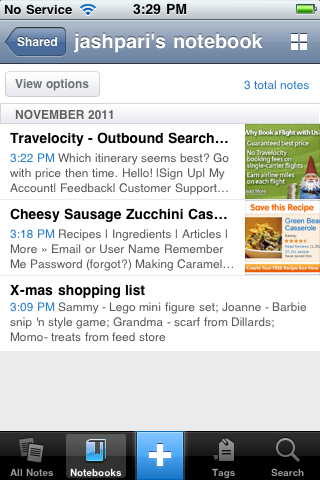
Evernote app; click for full-size image.
Share your Evernote notebook with
your partner to keep everyone
on the same page.

Many a domestic altercation might have been avoided if the contenders had shared some piece of vital information early on. But how do you make that kind of sharing a reality if you and your partner rarely have time to talk over plans and upcoming time commitments?

The answer may come from an app many people already use: Evernote. You can use this versatile note-taking service to share information such as recipes (handwritten or clipped from the Web), holiday shopping lists (with boxes to mark), pictures of furniture you may want to purchase, or an audio recording of your thoughts about an upcoming home remodel.

If you have a free Evernote account and share a laptop with your partner, though, you significant other will be able to read your notes but not add to them. Editing privileges among other perks, are reserved for premium account holders, who must pay $5 a month or $45 a year for the privilege.            More