Showing posts with label pcs. Show all posts

Monday, July 28, 2014

10 technologies that will transform PCs in 2015 and beyond


The PC's future is so bright, you gotta wear shades

You might write off PCs as archaic or boring. You might take for granted that they'll get faster, lighter, more power-efficient and more convenient to use over time.
But if you stop and consider all the things that go into making a computer better, there’s actually a lot to be excited about. Here are 10 PC advancements that will transform PCs over the next several years.

Wednesday, September 4, 2013

IFA - Sony launches a trio of new hybrid Vaio PCs


The Vaio Flip, Tap 21, and Tap 11 all combine elements of a PC and tablet.

CNET - At Sony's pre-IFA press conference, the electronics giant announced a trio of new Vaio PCs. Unlike previous years, none of the the three new systems highlighted here are traditional clamshell laptops. Instead, each combines the features of the PC and tablet, following the industry wide trend towards hybrid devices.

The Vaio Flip, Tap 11, and Tap 21 are all touch-screen Windows 8 devices that should be available later in 2013, although there are no set price and release date details yet. Each is briefly profiles below, with a link to more extensive hands-on coverage and photos.

View the PCs

Friday, October 19, 2012

Hands-on with Samsung's $249 Chromebook

Google hopes to tap into new markets with the $249 Samsung Chromebook, a laptop running Google's browser-based Chrome OS and built atop a Samsung A15-class ARM processor.
Google hopes to tap into new markets with the $249 Samsung 
Chromebook, a laptop running Google's browser-based 
Chrome OS and built atop a Samsung A15-class ARM processor.
(Credit: Stephen Shankland/CNET)
 
 
CNET - After using the new Samsung Chromebook for the better part of a workday, I have to say I'm impressed -- at least, considering the constraints of its $249 price tag.

Google announced the Samsung Chromebook today along with new ambitions to spread its browser-based, cloud-focused Chrome OS laptop much more widely. Google envisions it as being good as an extra machine that lies around the house or as a laptop for students.

I find it a reasonable device for those categories, especially for people like myself who already have their heads in the Google cloud with Google Docs, Google Drive, and Gmail. It's got workable if not standout hardware, its battery life is good, it switches on quickly, and the $249 price tag means it's not as much of a commitment as the $550 Samsung Series 5 550 that arrived in May.

However, given its sluggish performance sometimes, I can't say I was blown away by the Samsung Chromebook. It's fine for many tasks, but power users accustomed to having more than a couple dozen browser tabs open should steer clear.

More

Thursday, March 29, 2012

7 Great All-in-One Desktop PCs


All-in-one PCs are zippy, stylish, and just plain practical. Here’s why your next PC probably won’t be a tower.


7 Great All-in-One Desktop PCs

Traditional tower desktops have had a good run. All-in-one PCs–expensive upstarts just two or three years ago–have all but usurped the throne.

Towers will always have a special place in our hearts, as well as under the desks of enthusiasts and professionals who need more power and versatility. But for many PC users today, all-in-ones just make more sense. They take up a fraction of the space of a traditional PC, without sacrificing much in the way of performance. And that performance has improved while prices have dropped, so you don’t have to compromise. Most important, all-in-ones are paving the way for touchscreen adoption outside of tablets and smartphones. Touch and gestures are baked into the very core of Microsoft’s Windows 8, and all-in-ones will be ahead of the curve.

You’ll find no stronger evidence of the trend than the great selection of all-in-one PCs available today. Big-name desktop makers such as HP and Lenovo offer a wide array of all-in-ones, and Dell has jumped in on the action. Even laptop manufacturers like Samsung have recently introduced their first all-in-ones (and, not coincidentally, their first desktops) in years. You can expect plenty more once Windows 8 arrives, and Intel’s Ivy Bridge CPUs will make all-in-one PCs faster and slimmer still.

Overall, the options are great: If you’d like a large display to complement (or replace) a television, they don’t come any bigger than the HP Omni 27, a goliath with a gorgeous 27-inch screen. If you need to do some work, you’ll find plenty of strong performers: Lenovo’s ThinkCentre Edge line stands out, providing machines that are attractive, powerful, and stocked with security software and utilities that small businesses can appreciate.

We tested all of these all-in-ones with our revamped WorldBench 7 benchmark suite, which pits PCs against a battery of tests based on real-world usage models. Be sure to read “How We Test PCs” to learn all about our new methods and the apps we use.


All-in-One PC Reviews


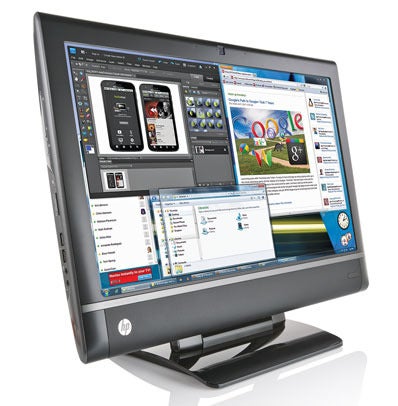
HP TouchSmart 9300 Elite all-in-one PC


1. HP Touchsmart 9300 Elite: The Consummate Workhorse
HP’s 23-inch TouchSmart 9300 Elite is a business-centric, all-in-one powerhouse. It may not be much to look at–it’s boring yet functional–but it delivers excellent performance and sits on an easy-to-adjust stand; the reclining design is very comfortable to use. It even tackles multimedia rather well. As befits a business PC, our test model ran the 64-bit version of Windows 7 Professional. If you’re seeking to get things done, this all-in-one fits the bill very nicely.

HP Omni 27 all-in-one PC


2. HP Omni 27: Big Things in a Big Package
When we first saw HP’s Omni 27 sitting in the PCWorld Labs, we were absolutely taken by its gorgeous, edge-to-edge, 27-inch glass screen. The rest of the design leaves a little to be desired, but this screen is definitely a step in the right direction. The only real complaint we have is that it’s not a touchscreen, which is pretty much standard for all-in-ones these days. Nevertheless, this is definitely an all-in-one that can double as a small television. In our tests, for example, Blu-ray playback was excellent, and HD video streaming looked very smooth.

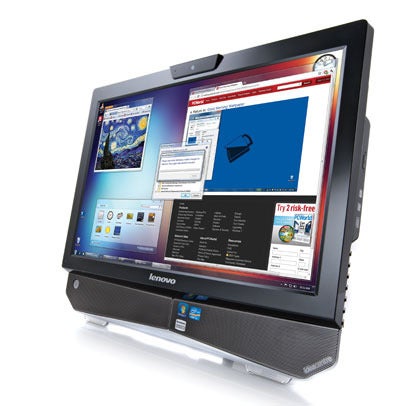
3. Lenovo IdeaCentre B320: HDTV, Budget All-in-One, or Just Confused?

Lenovo IdeaCentre B320 all-in-one PC


Lenovo bills the 21.5-inch IdeaCentre B320 as a “sleek desktop” with “two extreme missions”–to be an HDTV and to be a PC. It spreads itself a bit thin, however. It has an unusual mix of attributes, and its affordable price tag makes it a good fit for a cash-strapped college student in a small dorm room. But if you’re looking for stronger media capabilities and features (such as a Blu-ray drive) and you have a bit more coin to spare, a larger machine could be a more satisfying investment.

More

Monday, March 19, 2012

Review: HP Envy 14 Spectre (Laptop)


The good: The HP Envy 14 Spectre has a unique glass-covered design and packs a lot of features into a slim 14-inch ultrabook body, plus its multitouch response is great for a Windows laptop.

The bad: It’s expensive, especially considering the standard components, and feels heavier than it should. The glass wrist rest can be awkward.

The bottom line: The first big high-design laptop of 2012, the HP Envy 14 Spectre is a bold experiment that largely succeeds, if you’re willing to pay a premium for it.

There may be a reason most laptops are anonymous-looking gray boxes. When you do see a unique design, such as the Dell Adamo XPS or Acer Iconia, it’s often too quirky to catch on, or else the company behind it doesn’t give it enough time to find an audience before ditching the idea.

Read the Full Review!

Friday, January 13, 2012

At CES, tablet obsession gives way to tech’s bigger picture


Crowds descended upon Las Vegas to see the latest gear 
at the Consumer Electronics Show


ars technica - Last year’s Consumer Electronics Show was dominated by tablets to what now seems like a ridiculous extent. Everywhere you looked were Android and Windows 7 tablets—with at least one device running both operating systems. There were tablets promising only three hours of battery life, tablets costing more than $1,000, and dual-screen tablets including an Acer Iconia monstrosity with two 14-inch touch screens.

If vendors thought they could make headway in the iPad-dominated tablet market with mediocre devices, they seem to have realized their mistake. Much CES press coverage has dwelled on the show’s declining stature and noted that the year’s premium products are likely to emerge later on, because vendors would rather announce on their own product development and marketing schedules than reveal all their best stuff at CES.

That may be true—Microsoft’s news-free keynote and CES exit supports the argument—but at the very least vendors at this year’s conference seemed to have a more coherent plan based around multiple products like Ultrabooks and smartphones and tying them all together with cloud services. More importantly, CES took on the great technology debate of 2012: The Stop Online Piracy Act (SOPA) and its potential impact on Internet freedom.

It all made for a show more focused on the bigger picture than in the previous year. Although Microsoft’s keynote was disappointing—I was on the verge of apologizing to readers during our liveblog—Intel made up for it the next night by detailing its plan for bringing x86 processors to smartphones, in what it hopes will be the company’s answer to ARM’s mobile success. Intel also showed a prototype Ultrabook/tablet hybrid with a keyboard that can be folded under the screen or used as a stand for watching movies.           More

Monday, January 2, 2012

HP Folio 13 review


Engadget - By the time HP unveiled its first Ultrabook, the Folio 13, other heavyweights like Acer, ASUS, Lenovo and Toshiba had already gotten a head start of up to several months. But being fashionably late to market may have worked in Hewlett-Packard’s favor: the Folio 13 ($900 and up) is temptingly priced for what it is. Even the base model comes stocked with a 128GB SSD, backlit keyboard, HDMI port and Ethernet jack — specs that undercut the ASUS Zenbook UX31 and 13-inch MacBook Air, and render the $900 Acer Aspire S3 nearly irrelevant. Not to mention, it brings business-friendly features such as TPM circuitry that other Ultrabook makers have omitted from their 1.0 products. But surely HP cut some corners to get here, no? Is this really as sweet a deal as it seems? Funnily enough, the answer is “yes,” on both counts.

Look and feel


Considering how aggressively priced this thing is, HP made surprisingly few design compromises. Okay, the bottom is made of plastic, not aluminum, and the display offers narrow viewing angles, but other than that it’s well-made and yes, tasteful, even. We’ll wait a moment for all those folks who hate 1366 x 768 screens and things that aren’t metal to leave the room. Are they gone? Good. We think the rest of you will agree that that tried-and-true brushed metal lid was a safe design choice and also, a perfectly elegant one. Even better, those smooth metal surfaces continue onto the keyboard deck, stretching down to the palm rest. Particularly after reviewing split-personality machines like the Aspire S3, we appreciate that what’s underneath the lid matches the exterior.                      More

Sunday, November 13, 2011

Dell’s hard-to-beat all-in-one pc


The good: Dell’s attractive Inspiron One 2320 offers well-rounded performance and more media connection options than any other all-in-one in its price range.

The bad: An HDMI output to go along with the HDMI-in would be helpful, and a competing Lenovo all-in-one gives this Dell a strong performance challenge.

The bottom line: You can find a faster all-in-one from Lenovo for just a few more dollars, but as a general-purpose system with a strong home entertainment bend, the Dell Inspiron One 2320 is hard to beat.

Read the Full Review!

Tuesday, October 11, 2011

Review: HP Pavilion g4-1215dx - Budget Laptop


CNET Editors’ rating

3.5 stars Very good


The good: The HP Pavilion g4-1215dx has a great price, an attractive-for-the-price design, and better-than-average speakers, as well as enough graphics performance to play basic games.

The bad: A slower-performing AMD A4 processor is better than other bargain-basement processors, but less powerful than Intel’s Core i3; screen colors look washed out; battery life is merely average.

The bottom line: Budget shoppers take note: the extremely aggressively priced HP Pavilion g4-1215dx is a worthwhile laptop pick for those who want a basic, cheap computer. It’s hard to find a decent laptop for less–and we’ve seen lesser laptops that cost more.                   More

Saturday, September 24, 2011

12 Big Questions About the Amazon Tablet


PCMag.Com - If Las Vegas has odds on Amazon releasing a tablet device, you should not bet against it happening. That’s how pervasive and frankly convincing the onslaught of rumors about this as-yet unofficial tablet’s imminent release has been.

So let’s add some more, ahem, Kindle-ing to the fire.

Here’s what we know about Amazon’s tablet—people should “stay tuned” to see if there’s any truth to the rumors of the device, according to Amazon CEO Jeff Bezos.

That’s it. That’s the entirety of the official word from Amazon on a tablet aside from “no comment,” and Bezos made that cryptic statement way back in May.

But now that Amazon has sent out an invitation for a mysterious event on Sept. 28, the rumor mill is really spinning off its hinges. We could see a 7-inch, 9-inch, or 10-inch tablet in just a few days, according to various reports. As the expected due date of what’s rumored to be called the Amazon Kindle (yes, just like the company’s e-reader!) approaches, theories about what it is and what it means have gone into overdrive.

And aside from the reports about the device itself, folks are looking for clues in other places, too. Did you know that Amazon has been testing a tablet-friendly redesign of it website? Or that the e-commerce giant is believed to have registered “KindleAir.com” for whatever that’s worth?

The gossip about the Amazon tablet has also extended to speculation about what this rumored device will mean for ereaders. The consensus is that it could mean steeply slashed prices.

DigiTimes claims Amazon plans to cut Kindle ereader prices when it releases the rumored tablet. That jibes with what one knowledgeable source told PCMag in July—that consumers should expect a sub-$100 ereader before the end of the year.

And almost Apple-esque fashion, rumors are even cropping up about what Amazon has planned after it releases an as-yet-unannounced product that nobody with official cred is on the record as saying even exists. TechCrunch, which claimed earlier this month to have handled a testing version of a 7-inch Amazon tablet, says the company is also working on a “multi-touch screen/e-ink hybrid tablet device” but it’s “nowhere near completion.”

But let’s get to the meat of what we know, or think we know about Amazon’s much-ballyhooed, so-far-invisible tablet. Click through the slide show for a breakdown of all the strictly unofficial gossip that’s out there, plus one rumor that we’ve made up from scratch.

Click here to see “12 Big Questions About the Amazon Tablet” slideshow >

Thursday, August 25, 2011

Gadgets and computer gear: How to clean them


CNET - We all love our gadgets and computer gear, but how often do we actually take the time to clean them? Probably not often enough.

The cleaning tips below will not only make them look good, but will make them more sanitary and run better.

Computers and peripherals

Keyboard and mouse
Computer keyboards can get pretty filthy from just normal use, not to mention from eating at our desks or working while we’re sick.  Studies have shown that keyboards have more bacteria than toilet seats–ick!  It’s a good idea to regularly clean and disinfect your keyboard and mouse, especially if you share them with others. Find out how to clean your keyboard and mouse.

Watch the Video:  Clean and disinfect your keyboard


Computer LCD display
Remember when your computer LCD display had that brand-new, fresh out-of-the-box shine?  If it’s looking a little dull lately, it might be time to give it a good cleaning. Learn how to clean your LCD.

Flatbed scanner
Have you ever scanned a photo, only to see specks of dust in high resolution?  Rather than despeckling the scanned image with software, clean the glass. Find out how to clean your scanner.

Computer interior
Heat is your computer’s worst enemy.  Over time, dust buildup inside your computer could undermine its cooling efficiency, resulting in shorter life spans for your computer’s components.  To help keep your computer running cool, clean the inside of your computer every 6 to 12 months. Learn to clean the insider of your PC.


Gadgets

Smartphone and tablet
Remove unsightly fingerprint smudges, dust, and oil from your smartphone or tablet and learn what you can do if your device gets wet. We show you how to clean your smartphone and tablet.
Point-and-shoot digital camera
Don’t let a dirty lens ruin your photos.  Keeping your camera clean is vital for when that perfect photo opportunity presents itself. Find out how to clean your camera.

If there’s more gear you’d like to learn how to clean, let us know in the comments; perhaps it will get added to the list.

Thursday, July 7, 2011

How to Build a Perfect Home Theater PC

How to Build A Slim, Stylish, Low-Power Home Theater PC
PCMag.Com - Suppose you’re interested in assembling a small, energy-efficient home theater PC (HTPC) that you’d also be proud to display in (or on top of) your entertainment center, but you didn’t want to invest huge amounts of time or money into making it happen. That’s reasonable—even die-hard builders with the best of intentions sometimes prefer to take a few shortcuts rather than reinventing the wheel every time a whim strikes. You can build exactly the HTPC you want—or almost any other kind of PC—in a dizzyingly short period of time by using a barebones kit.

These are kits by name vendors that give you the frameworks you need for a PC, but don’t fill in all the blanks for you. You may get one preloaded with a certain motherboard, for example, but the processor, RAM, video card, and any other components are left up to your discretion and budget. Using a barebones system helps you get the best of both the building and buying worlds: the satisfaction of doing a lot of it yourself along with the convenience of not having to fit every single piece of hardware into place (especially as many barebones systems are tiny or feature unusual interior configurations).

We decided to do something slightly different this month and see if we could satisfy our stylish-HTPC hankering by way of a barebones. The process would shorter and simpler than most builds—which is okay once in a while!—but would still net us a system we could be proud of. In doing all this, we were reminded that even a relatively simple build such as this one can present a few tricks or obstacles—and figuring out how to work with the exceptions always makes you better when you need to work within the rules.

Our starting point for our system was Zotac’s Zbox, a system that’s thinner and lighter than most college textbooks, but has a two-tone coloring scheme and elaborate LED design that makes it look better than any physics primer we ever lugged around during our university days. The AD03BR-U ($419.99) turned out to be exactly what we were looking for: It comes with a 1.6GHz E-350 motherboard/CPU combo from AMD; that should do for our modest needs. Plus, it’s got built-in Wi-Fi, which will reduce the number of wires we need to run to it, and an integrated Blu-ray drive for playing our high-definition movies. (The Zbox is more convenient and attractive than a lot of Blu-ray players out there.)

This didn’t leave us with a lot of other choices to make—in fact, we just needed to worry about storage and memory. We considered splurging on a solid-state drive (SSD), but wanted to keep the cost down. So instead we went with a 7,200-rpm 750GB Seagate Momentus ST9750420AS—that’s speedy for a 2.5-inch drive, and is a comfortable amount of space. The price was $79.99, with $10 off thanks to a special Newegg offer, so we liked its affordability, too. It also met another crucial requirement: It was only 9.5mm high—something that was necessary for it to fit into the Zbox case. (Other hard drives can measure 12mm, which is too thick for this application, as we’ll soon see.) To maximize performance, we knew we wanted to go all-out on memory. This meant 8GB, the most this system can hold, and we got that by way of a PNY Optima kit on Newegg; a $20 rebate got us the chips for only $54.99, a fine, low price.

And that’s it! Putting the system together doesn’t even take much more time than does plotting it all out. But because the process is more like upgrading a laptop than working on a traditional desktop, a little rethinking is required.

Thursday, June 30, 2011

HP TouchPad Review

CNET -

The good: The HP TouchPad uses Palm's unique WebOS interface and delivers Adobe Flash-enabled Web browsing, Beats audio enhancement, and impressive compatibility with third-party calendar, messaging, and e-mail services.


The bad: The TouchPad has a thick, smudgy design, offers no rear camera or HD video capture, includes a limited app selection, and its unique cards system of multitasking isn't as fully utilized as it could be.

The bottom line: The TouchPad would have made a great competitor for the original iPad, but its design, features, and speed put it behind today's crop of tablet heavyweights.