The PC's future is so bright, you gotta wear shades
You might write off PCs as archaic or boring. You might take for granted that they'll get faster, lighter, more power-efficient and more convenient to use over time.
But if you stop and consider all the things that go into making a computer better, there’s actually a lot to be excited about. Here are 10 PC advancements that will transform PCs over the next several years.
PCWorld - Open your pocketbooks, 4K fans, Toshiba's first Ultra HD laptop is
headed your way next Tuesday. The Tokyo-based electronics maker just
announced that the Toshiba Satellite P55t will hit U.S. store shelves on
April 22, starting at $1,500 for the base model.
For all that cash you'll get a 15.6-inch laptop with a quad-core Intel
Core i7 processor (no word on the specific model), up to 16GB RAM, an
AMD Radeon R9 M265X discrete graphics card with 2GB RAM, and a 1TB hard
drive. Other niceties include Windows 8.1, four USB 3.0 ports, backlit
keyboard, SD card slot, 802.11ac Wi-Fi, HDMI out, and some brand name
speakers from Harman Kardon.
But the big feature for the P55t is the laptop's screen resolution,
which is 3840-by-2160 with 282 pixels per inch. Astute 4K fans will note
that Toshiba's new clamshell is using the Ultra HD version of 4K and
not the 4096-by-2160 resolution favored by the film industry and
available on some external monitors.
In addition to its Ultra HD resolution, Toshiba's laptop earned
Technicolor Color Certification, promising more natural-looking colors
and "true-to-life imagery." Toshiba is also bundling a free copy of Adobe Photoshop Lightroom 5 to take advantage of all that 'glorious Technicolor.' Read More
Wired - Andrew “bunnie” Huang and Sean “xobs” Cross want to sell you a laptop you can completely trust.
Earlier this year, the two Singapore-based engineers fashioned a laptop made almost entirely from open source hardware,
hardware whose designs are freely available to the world at large. They
called it Project Novena. Anyone could review the designs, looking for
bugs and security flaws, and at least in theory, that meant you could be
confident the machine was secure from top to bottom, something that’s
more desirable than ever in the post-Edward Snowden age.
“The motherboard, battery board, and display adapter board are
designs from whole cloth,” Huang told us. “Every trace on those PCBs was
placed by my hand.”
The original idea was simply to encourage others to build their own
open source laptops at home. But now the pair are taking the project a
step further. Starting today, you can order your own pre-built Novena laptop
through the crowd-funding site Crowd Supply, and it will ship out in
the coming weeks. Much like Kickstarter, Crowd Supply is place where you
can put up money to help fund a company and then get a product in
exchange. Read More
The good:The Acer Chromebook C720P
has a good keyboard, an SD expansion slot, USB 2 and 3 ports, and HDMI,
plus a touch screen. It also has more onboard storage (32GB) than most
entry-level Chromebooks, and better battery life than most previous
Chromebooks.
The bad: Low-end price is matched by its low-end feel. Chrome OS has natural limitations. Touch isn't always that useful in Chrome.
The bottom line:The
Acer Chromebook C720P manages to get better at all the key things,
adding up to a little laptop alternative that's better than any budget
Chromebook we've seen before.
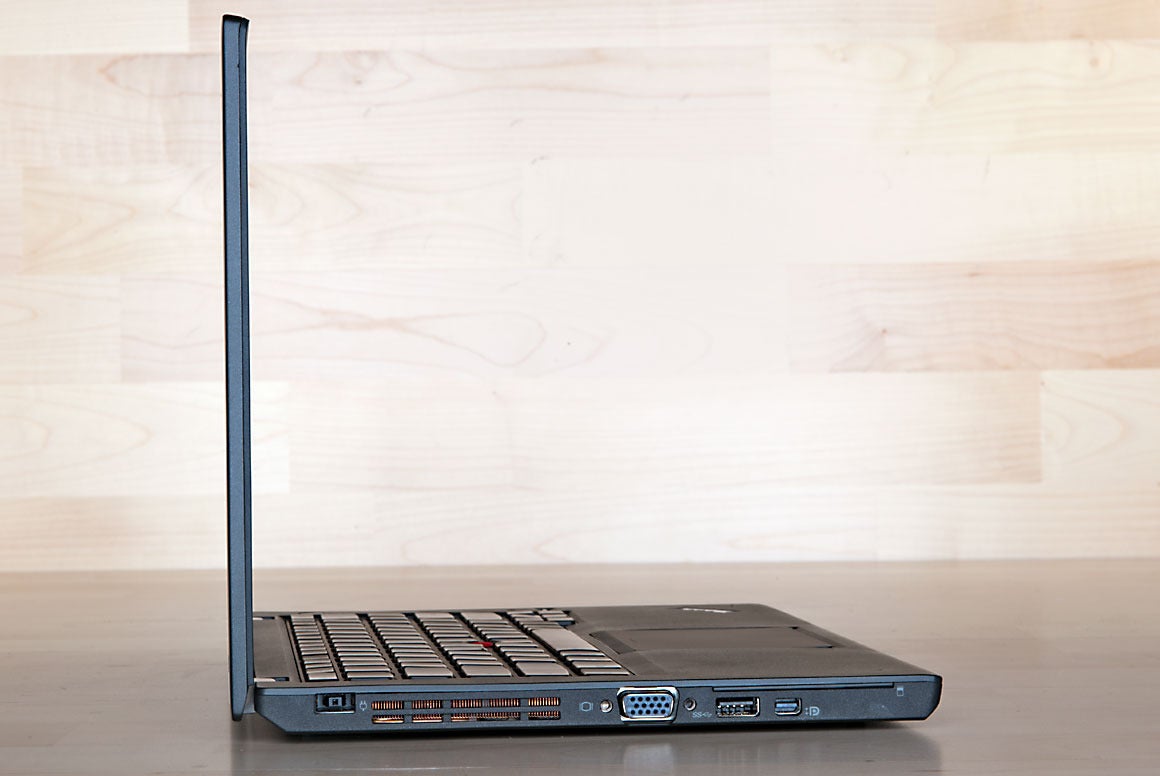
PCWorld - If Lenovo’s spendy ThinkPad X1 Carbon is the laptop every corporate
drone craves, Lenovo’s thrifty ThinkPad X240 is the laptop their
employer is more apt to spring for (assuming, of course, that the
company’s IT department has standardized on Lenovo and not Dell, HP,
Toshiba, or some other commercial laptop builder).
You might think the ThinkPad X240 is too thick and too heavy to qualify
for Ultrabook designation, but it’s only 0.79 inches thick and it weighs
just 3 pounds. And there’s a very good reason why the X240 doesn’t
taper to a knife edge like the X1 Carbon does: The X240 is outfitted
with two batteries and a battery bridge that enables you to swap a
depleted battery for one that’s fully charged without turning the machine off. That’s slick.
ROBERT CARDIN Lenovo's ThinkPad X240 looks thick only next to wafer-thin notebooks
like Lenovo's ThinkPad X1 Carbon. This machine is only 0.79 inches thick
and it weighs three pounds.
PCWorld’s Worldbench suite rewards laptops equipped with SSDs—the
configuration reviewed here includes a 256GB model—but the X240’s score
of 282 leaves it slightly behind Dell’s XPS 12 Ultrabook Convertible
(which has the same dual-core CPU) and Samsung’s Ativ Book 7 (which is
powered by a third-generation Core i5-3337U, another dual core). This is
a little surprising considering that the ThinkPad had twice as much
DDR3/1600 memory: 8GB versus 4GB in the Dell and the Samsung. Read More
PCWorld - After prematurely letting the cat out of the bag with some weekend
website leaks, Dell announced two new Ultra HD "4K" UltraSharp monitors
on Monday: A 31.5-inch model as well as a 24-inch version, with both
running at full 3840-by-2160-pixel resolution.
Dell's touting the 31.5-inch UltraSharp as the flagship model, but to be frank, 32-inch screens are, well, enormous when they're just a few feet away from your face, and 31.5-inch 4K monitors are nothing new. Witness the Asus PQ321 Ultra HD, which sports the same resolution and $3,500 price tag as Dell's new display.
The Dell UltraSharp 24 UltraHD
appears more eye-catching, at least on its 183 pixels-per-inch surface.
Besides being a more desk-friendly size, the monitor packs a $1,400
sticker price—still steep for a monitor, but far more
budget-friendly than its 32-inch counterparts. The IPS display offers
178-degree viewing angles and an adjustable stand, along with 99 percent
AdobeRGB and 100 percent sRGB color gamut reproduction augmented by a
factory calibration and baked-in fine-tuning tools. Read More
Business Insider - Over the weekend, analyst Ming-Chi Kuo of KGI Securities revealed that Apple has plans for a new laptop in 2014.
In a note picked up at 9 to 5 Mac,
Kuo says Apple is planning a high-resolution 12-inch laptop that will
be as portable as the 11-inch MacBook Air, but as productive as the
13-inch MacBook Air.
This new MacBook will "redefine laptop computing" according to
Kuo, just like the current MacBook Air redefined laptop computers when
it was introduced in 2010. (The original MacBook Air was out in 2008,
but was flawed. The 2010 version fixed the flaws and became the industry
standard.)
This new laptop will be thinner and lighter than the current MacBook Airs, per Kuo.
With a variety of new Dell tablets, laptops, and tablet/laptop hybrids, we've rounded up the most impressive of the bunch.
CNET - For the bulk of 2013, any headlines you've read about Dell have more
than likely been about the company's rocky transition from public to
private company, via a $25 billion buyout from Silver Lake Partners.
But with today's announcement of a long list of new Windows 8.1
laptops, tablets, convertible devices -- and even a pair of low-cost
Android tablets -- the company is putting the focus back on its hardware
offerings.
With its updated lineup, the once-dominant Texas PC giant seems to be
taking on all comers. With prices starting at $999 and the addition of a
high-resolution touch-screen, the XPS 13 and 15 ultrathin laptops take
aim at Apple's MacBook Air and Retina-screen Pro lines. XPS 11 and 12 convertibles are Dell's answer to innovative form factors like Lenovo's Yoga and Sony's Vaio Flip.
Meanwhile, a slew of new
tablets
-- the all-new Venue line -- stakes Dell's claim into the market that's
eating into traditional PC sales. On the Windows side, the Venue 11 Pro
is an 11-inch tablet with a detachable keyboard that will go
head-to-head with the likes of Microsoft's upcoming Surface Pro 2. The Venue 8 Pro joins the ranks of the new, small form-factor
Windows 8.1 tablets from the likes of the Toshiba Encore and Asus VivoTab Smart ME400, and wows with a starting price of just $299.
And Dell is returning to the
Android world with the $149 7-inch Venue 7 and $189 8-inch Venue 8, offering competitors to Google's $229 Nexus 7 and Apple's iPad Mini (which is due to be refreshed later this year).
We've listed some of the more interesting new devices that feature an
array of impressive specs, affordable pricing, and innovative design.
The Dell Venue 7 tablet is a smaller version of the Venue 8.
Dell is taking another stab at releasing a compact Android slate with
the 7-inch Venue tablet and, even though it doesn't boast the most
high-end specs, it's still a considerable upgrade from Dell's Streak 7.
The Venue 7 bears an appealing $149 starting price -- for 16GB of
internal storage -- and houses a 2GHz Clover Trail processor, with a
modest 1,280x800-pixel-resolution IPS screen. It also comes in an 8-inch
model.
The good:Dell's new Alienware 14 offers great performance, competitive prices, and quirky features such as a backlit touch pad.
The bad:The new design still feels dated, and it's as thick as a few slim laptops stacked together. The fan is insanely loud.
The bottom line:Dell has revamped its gaming line, including the new Alienware 14. The design changes don't go nearly far enough, but no complaints about the performance.
PCWorld - Acer has announced that a new version of its C7 Chromebook will be
available at Walmart stores and online at Walmart.com for $199. The
refreshed model includes a 16GB SSD.
The model C710-2856 Chromebook has an 11.6-inch LED-backlit LCD panel
with native resolution of 1366 by 768 pixels. It's powered by a 1.1GHz
Intel Celeron 847 processor and 2GB of DDR3 memory. Apart from swapping a
320GB mechanical hard drive for an SSD, this computer's specifications
are the same as the earlier $199 Chromebook that Acer announced in November 2012.
The good:The Sony Vaio Pro 11
weighs less than 2 pounds and uses a fourth-gen Intel Core i5 to
deliver long battery life and very good everyday performance. It has an
excellent 11.6-inch 1080p touch screen and is competitively priced for
its features.
The bad:The
Pro 11, like its competition, has a nonremovable battery (though you
can add an external battery), few ports and connections, and integrated
graphics only. System memory is maxed out at 4GB.
The bottom line:The superthin, superlight Sony Vaio Pro 11 is everything we expect from an excellent ultrabook.
CNET - The added models should give Samsung entry points into a wider range of the tablet market. They'll be available early this month.
Samsung has released the details for an 8-inch and a 10.1-inch tablet
joining the popular Galaxy Tab series, along with the 7-inch model
currently available.
In an announcement Monday, the South Korean firm unveiled the Samsung Galaxy Tab 3 models in the new sizes.
The 8-inch Galaxy Tab 3 is possibly a response to the popular iPad Mini and Google Nexus 7. The
tablet is powered by a 1.5GHz dual-core processor and a 1280x800-pixel HD screen, and runs on
Android
4.2, otherwise known as Jelly Bean. The 8-inch model also sports two
cameras, the front shooting at 1.3 megapixels and the rear reaching 5
megapixels. More
You
can dive into the various subcategories here for detailed suggestions
for every need and budget, but on this page, we present the current
laptops that are our personal favorites, because of style, power, value,
or just because we like them.
The
newly redesigned MacBook Pro with Retina Display combines an amazing
screen with just enough of the MacBook Air design to feel like a new
animal, and to take its place as the best of the current MacBook breed.
This
year's MacBook Air opts for gradual improvements rather than anything
revolutionary, but lowered prices continue to make it the go-to
mainstream recommendation for any MacBook owner-to-be.
For
those looking for something more than a feature-light ultrabook, the
gamer-friendly Lenovo IdeaPad Y500 is close to brilliant, and several
configurations are currently available at a deep discount -- but I can't
believe it doesn't have a touch screen.
The
Surface Pro's gutsy design successfully reinvents the Windows 8 laptop
by cramming an ultrabook experience into the body of a 10-inch tablet.
Those wanting to go all-in on the tablet experience won't regret buying
the Surface Pro, but we're holding out for a future, more polished
generation of the device.
The good:The Dell XPS 18
combines an all-in-one PC with a lightweight 18-inch tablet, making it a
flexible system for at-home entertainment and productivity.
The bad: You're paying a premium for a relatively small screen. Less expensive configurations cut too many corners to be a good deal.
The bottom line:It's
the best of the small handful of current tablet/all-in-one hybrids,
with a subtle, sophisticated design and good battery life, but this new
genre is still in its early days.
Photograph by Robert Cardin
PCWorld - Computers may have
become a lot more user-friendly over the past decade, but they’re still
far from perfect—PCs require a certain amount of configuration and
maintenance to operate at their full potential. Unfortunately, because
we humans are also far from perfect, we frequently don’t put in the work
we should, and we end up with a slower, sloppier, less secure machine
as a result.
No more excuses! Whipping your PC into the best shape it can be
requires but a dozen simple tasks. None are complicated, most take a
matter of minutes, and all will have a major effect on how well your
computer works for you. Even better, by the time you’re finished you’ll
never have to worry about doing many of these tasks again.
Clean the case, keys, and display
The first task is the most basic: Are you keeping your computer
clean? It’s not just important because a dirty PC looks gross, or is
less pleasant to use. Simply put, a clean computer can last longer. Dirt
and dust buildup in and around your computer can clog the fans and air
intakes, causing your hardware to run hotter, which lowers its expected
life span. So if your PC is looking a little musty, take the time to
clean it.
To do so, you need to
have only a few things on hand: a Phillips-head screwdriver, a can of
compressed air, paper towels, and rubbing alcohol.
Once you’re ready to begin, shut down your computer, unplug it, and
move it somewhere with a little open space in which to maneuver. Look on
the back panel, and find the screws that hold the case’s side panels in
place. Unscrew them—making sure to put them someplace safe—and remove
the side panels, usually by sliding them backward and then pulling them
away. If you haven’t cleaned the computer in a long time, you should
immediately see some areas where dust has collected.
You’re likely to find the most dust bunnies on the fans inside the
computer and on the vents outside. You can remove a lot of dust simply
by wiping the fans gently with a paper towel, and by using a lightly
dampened paper towel on the vents. Once you’ve wiped away any piled-up
dust, use the can of compressed air to blow the dust out of the inside
of any heat sinks, such as the one attached to the CPU or the graphics
card. Use the air to clean out remaining dust from the system’s various
fans too, but be careful: A sustained blast of air can overspin the fan,
damaging it. Either use short bursts of air or hold the fan with your
finger to prevent it from spinning. Afterward, clean out any other dust
you see inside the case.
PCWorld - By gaming standards, the HP Envy Phoenix h9-1420t's appearance is
positively subdued. This midsize tower PC has some red backlighting and a
clear pane so that you can gaze at the liquid cooling unit, but aside
from that it could easily pass for a conventional HP desktop. Although
it doesn't have much in the way of bling, the Phoenix delivers
better-than-average performance at a cheaper-than-boutique price.
Down-the-road upgrade options, on the other hand, are limited by its
decidedly nonenthusiast motherboard.
Components and performance
Our $1840 h9-1420t test configuration sported an unlocked 3.5GHz Intel
Core i7-3770K processor. Thanks to the liquid cooling unit, the system
had no problem maintaining 4GHz, and it likely has at least a little
more headroom. The Pegatron (that’s Asus’s OEM arm) 2AD5 motherboard
offers minimal overclocking controls in its BIOS, but it isn't
completely locked down. You can set each core's maximum frequency
multiplier separately, but you get no provisions for tweaking the
operating voltage, for instance. The board also has just a single
full-size PCIe slot, so you can forget any dual-card graphics upgrade
via SLI or CrossFire.
Fortunately, HP picked a strong graphics card, inserting an Nvidia
GeForce GTX 680 with 2GB of GDDR5 memory. With that card in place, the
Phoenix managed a playable frame rate in Dirt Showdown right up to the
2560 by 1600 resolution of our 30-inch test display. The game wasn’t as
silky smooth at that resolution as it was at lower ones, but it was
certainly playable. Should you decide to buy an h9-1420t online, HP
allows you to customize the configuration to a degree, but your options
don’t include Nvidia’s best GPU, the GeForce GTX 690.