Showing posts with label windows. Show all posts

Friday, January 24, 2014

New Windows malware tries to infect Android devices connected to PCs


PCWorld - A new computer Trojan program attempts to install mobile banking malware on Android devices when they’re connected to infected PCs, according to researchers from Symantec. 

This method of targeting Android devices is unusual, since mobile attackers prefer social engineering and fake apps hosted on third-party app stores to distribute Android malware. 


“We’ve seen Android malware that attempts to infect Windows systems before,” Symantec researcher Flora Liu, said Thursday in a blog post. “Android.Claco, for instance, downloads a malicious PE [portable executable] file along with an autorun.inf file and places them in the root directory of the SD card. When the compromised mobile device is connected to a computer in USB mode, and if the AutoRun feature is enabled on the computer, Windows will automatically execute the malicious PE file.” 


“Interestingly, we recently came across something that works the other way round: a Windows threat that attempts to infect Android devices,” Liu said.    Read More

Wednesday, October 2, 2013

Dell takes on the world with Android and Windows tablets, high-end XPS laptops


With a variety of new Dell tablets, laptops, and tablet/laptop hybrids, we've rounded up the most impressive of the bunch.

CNET - For the bulk of 2013, any headlines you've read about Dell have more than likely been about the company's rocky transition from public to private company, via a $25 billion buyout from Silver Lake Partners. But with today's announcement of a long list of new Windows 8.1 laptops, tablets, convertible devices -- and even a pair of low-cost Android tablets -- the company is putting the focus back on its hardware offerings.

With its updated lineup, the once-dominant Texas PC giant seems to be taking on all comers. With prices starting at $999 and the addition of a high-resolution touch-screen, the XPS 13 and 15 ultrathin laptops take aim at Apple's MacBook Air and Retina-screen Pro lines. XPS 11 and 12 convertibles are Dell's answer to innovative form factors like Lenovo's Yoga and Sony's Vaio Flip.

Meanwhile, a slew of new tablets -- the all-new Venue line -- stakes Dell's claim into the market that's eating into traditional PC sales. On the Windows side, the Venue 11 Pro is an 11-inch tablet with a detachable keyboard that will go head-to-head with the likes of Microsoft's upcoming Surface Pro 2. The Venue 8 Pro joins the ranks of the new, small form-factor Windows 8.1 tablets from the likes of the Toshiba Encore and Asus VivoTab Smart ME400, and wows with a starting price of just $299.

And Dell is returning to the Android world with the $149 7-inch Venue 7 and $189 8-inch Venue 8, offering competitors to Google's $229 Nexus 7 and Apple's iPad Mini (which is due to be refreshed later this year).  

We've listed some of the more interesting new devices that feature an array of impressive specs, affordable pricing, and innovative design.


The Dell Venue 7 tablet is a smaller version of the Venue 8.
(Credit: James Martin/CNET)
 
Dell Venue 7

Dell is taking another stab at releasing a compact Android slate with the 7-inch Venue tablet and, even though it doesn't boast the most high-end specs, it's still a considerable upgrade from Dell's Streak 7. The Venue 7 bears an appealing $149 starting price -- for 16GB of internal storage -- and houses a 2GHz Clover Trail processor, with a modest 1,280x800-pixel-resolution IPS screen. It also comes in an 8-inch model.

Read more about the Dell Venue 7 here.

View the Rest!

Tuesday, June 4, 2013

The entire history of Windows in one video

Watch the entire string of upgrades from Windows 1.0 to Windows 8, as well as some gameplay from Reversi and Doom, in just over an hour.


CNET - Windows has come a long way over the decades from the now antiquated-looking boxes of Windows 1.0 to the layers upon layers of desktops, start screens, charms, tiles, and whatever that bar on the left is in Windows 8.    More

Thursday, May 23, 2013

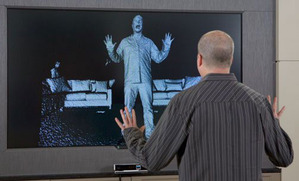
Next-generation Kinect for Windows won't be for the average user


PCWorld - Microsoft has made it official: The new-and-improved Kinect that will ship with the Xbox One later this year will also come to Windows in 2014.

The Windows version will offer the same improvements found in the Xbox One’s Kinect. The device has a wider field of view, better depth detection, an improved noise-canceling microphone, more precise skeletal tracking, and ambient light detection.

But don’t expect Kinect to replace your PC’s mouse and webcam anytime soon. Microsoft still envisions Kinect primarily as a product for businesses and organizations, though the company expects consumers to interact with the motion controller in public places.

“It’s going to be the spaces that are stand-up play spaces similar to the living room experiences,” Bob Heddle, Microsoft’s director of Kinect for Windows, said in an interview. “I would imagine that most consumers will see this in interactive retail screens, for example … virtual product trial is very interesting, things like magic mirrors to try on virtual clothing.”

More

Saturday, May 11, 2013

Best Laptops - CNET Guide

You can dive into the various subcategories here for detailed suggestions for every need and budget, but on this page, we present the current laptops that are our personal favorites, because of style, power, value, or just because we like them. 
 
Apple MacBook Pro with Retina Display

Best high-end laptop

Apple MacBook Pro with Retina Display

The newly redesigned MacBook Pro with Retina Display combines an amazing screen with just enough of the MacBook Air design to feel like a new animal, and to take its place as the best of the current MacBook breed.
4 stars Excellent Editors' Choice - Apple MacBook Pro with Retina Display Read full review
 
Apple MacBook Air (13-inch, Summer 2012)

Best ultra-thin 13-inch

Apple MacBook Air (13-inch, Summer 2012)

This year's MacBook Air opts for gradual improvements rather than anything revolutionary, but lowered prices continue to make it the go-to mainstream recommendation for any MacBook owner-to-be.
4 stars Excellent Editors' Choice - Apple MacBook Air (13-inch, Summer 2012) Read full review
 
Lenovo IdeaPad Yoga 13

Best convertible laptop

Lenovo IdeaPad Yoga 13

The Lenovo IdeaPad Yoga 13 is a convertible touch-screen laptop/tablet that most importantly doesn't compromise the traditional laptop experience.
4 stars Excellent Read full review
 
Toshiba Satellite U845t

Best laptop under $800

Toshiba Satellite U845t

While it's not going to dazzle anyone, the Toshiba Satellite U845T is a great example of exactly how much laptop $799 should buy in 2013.
4 stars Excellent Read full review
 
Lenovo IdeaPad Y500

Best gaming laptop

Lenovo IdeaPad Y500

For those looking for something more than a feature-light ultrabook, the gamer-friendly Lenovo IdeaPad Y500 is close to brilliant, and several configurations are currently available at a deep discount -- but I can't believe it doesn't have a touch screen.
4 stars Excellent Read full review
 
Microsoft Surface with Windows 8 Pro (64GB)

Best Windows 8 tablet

Microsoft Surface with Windows 8 Pro (64GB)

The Surface Pro's gutsy design successfully reinvents the Windows 8 laptop by cramming an ultrabook experience into the body of a 10-inch tablet. Those wanting to go all-in on the tablet experience won't regret buying the Surface Pro, but we're holding out for a future, more polished generation of the device.
4 stars Very good Read full review


More Laptop Reviews

Wednesday, June 13, 2012

Apple iOS 6 vs. Android vs. Windows Phone (Comparison Chart)


PCWorld - Apple's World Wide Developer Conference (WWDC) kicked off today with the unveiling of iOS 6 for the iPhone and iPad. Apple is promising over 200 new features in the latest version of its mobile operating system, but only a few of them were highlighted in the keynote.

June is an exciting month for smartphone fanatics as Microsoft is expected to unveil the next generation of Windows Phone at an event next Wednesday, June 20 while Google is expected to reveal its plans for the next version of Android, codenamed "Jellybean."

While some of the features Apple announced today already exist on competing platforms, Apple is putting its own twist on these updates. For example, Siri, Apple's voice-activated virtual assistant, is even smarter now with support for sports, movies, and restaurants. Siri can also directly launch apps, but you still can't control these third-party apps with your voice.

Apple is also breaking up with Google Maps and launching its own Maps application with iOS 6. It includes local business information, Yelp integration, real-time traffic updates, and turn-by-turn navigation. Naturally, Apple has also added Siri integration to maps so you can ask questions along your journey such as, "Are we there yet?" or "Where's the next gas station?" Apple has also added a 3D/fly-over mode to its Maps application, which shows you detailed 3D models of buildings and landmarks.

Read More & See the Comparison Chart

Monday, June 11, 2012

Metro-style Hotmail turns up in leaked screenshots

Metrostyle Hotmail turns up in leaked screenshots


Engadget - It certainly wouldn't come as much of a surprise that Microsoft would finally bring Hotmail into the Metro fold, but until now we haven't had much evidence that such a change was actually in the works. If a set of leaked screenshots obtained by WinFuture are any indication, however, it looks like the nearly sixteen-year-old email service could soon be getting one of its biggest redesigns to date.   

More

Monday, May 14, 2012

Thunderbolt on Windows gets hands-on, lacks Mac's hot-swapping

Thunderbolt on Windows gets hands-on, lacks Mac's hot-swapping

Engadget -

Thunderbolt's 10-gigabit interface is only just making its way to Windows after spending more than a year as a Mac-only feature, so it's not surprising that a lot of questions surround how well the Apple- and Intel-developed connection works for those of a Microsoft persuasion. A thorough test at AnandTech of one of the first motherboards to support the spec on Windows PCs, an Ivy Bridge-ready board from MSI, has shown some positive signs along with a few flies in the high-speed ointment.            More

Monday, March 12, 2012

Mozilla begins development of Firefox for Metro


Summary: Mozilla today announced that it has begun “a very large project” to build a Metro styled version of Firefox for Windows 8. Can Firefox for Metro really be ready this summer?
Mozilla’s Brian R. Bondy revealed today that development has begun on Firefox for Metro.

Last month, Mozilla’s Asa Dotzler announced that a Metro version of Firefox was in early planning stages, with a blog post about Mozilla’s goals that in turn linked to a roadmap. Dotzler is listed as the product manager.

Today’s announcement fleshes out some of the key decisions that the Mozilla team has made in the past month.

According to Bondy, Firefox for Metro will mimic Internet Explorer 10’s split personality, as a “Metro style enabled desktop browser”:
Unlike Metro applications, Metro style enabled desktop browsers have the ability to run outside of the Metro sandbox. Meaning not only can we build a browser, but we can build a powerful browser which gives an experience equal to that of a classic Desktop browser.

Metro style enabled desktop browsers have access to most Win32 API and the entire new WinRT API.

Unfortunately a browser can only participate in Metro mode if it is the default browser. So if Firefox is not the default browser on a system, you can’t use it in Metro mode. This is a decision made by Microsoft.                   More

Friday, February 24, 2012

OnLive Desktop Plus Hands On: They Put Windows on My iPad


Gizmodo - How impressive is the Desktop Plus version of OnLive’s iPad software? For $4.99 a month it basically lets you run full Windows on your iPad, and at blazing speeds to boot. This is the cloud done right. Mostly.

OnLive is a cloud-based gaming company, and what it has done is to take the same technology that shoots first person shooters to your screens and apply it to running apps over the cloud. The company leverages countless servers in data centers connected to gigabit ethernet to run various programs for you—including Microsoft Word, PowerPoint, Excel, and Internet Explorer—and then it sends that video to your iPad. Essentially, it turns your iPad into a display for one of its servers.

What’s that mean in practice? First and foremost it means you can have Office on your iPad right now, today, and free, which was the promise of the original OnLive Desktop. You can edit documents, run video in PowerPoint presentations and basically do anything that you could if you were using Office on a desktop. You can use a software keyboard for input (which includes a Windows-centric keyboard layout) or hook up a bluetooth keyboard. It also recognizes handwriting, which is a neat trick.          More
wordpress visitor counter

Friday, January 20, 2012

How To Restore Your Computer Using Windows 7


PCMag.Com - One mistake doesn’t need to leave you with an unusable computer. Using Windows 7′s built-in tools, you can preserve and reinstate whole hard drives with just a few clicks.
 
You’ve undoubtedly heard it a million times (probably some 900,000 of which came from us): Back up your data! And that’s advice you should absolutely follow. But simple backups aren’t always enough for a Windows 7 system. You might be hit with a catastrophic virus attack, accidentally delete a critical system file, or mess with the wrong hard drive partition and find that your PC will no longer boot. At that point, no number of external hard drives loaded with copies of your photo and MP3 collections will get you up and running again.

That’s why, in addition to backing up individual files and folders of particular value, you should also stock your arsenal with more powerful system recovery weapons. You can buy software that will take care of this for you—Norton Ghost is a classic, powerful product—but Windows 7 has some built-in utilities that will provide an additional layer of security and not cost you one penny more. You’ll need a bit of time, some free drive space (or blank DVDs), but the peace of mind you get in return will be well worth that investment.


How to Find Windows 7′s Repair and Restore Tools


How to Repair and Restore Your PC Using Windows 7 - 01

1. Click on the Window icon (aka the “Start button”) on your taskbar, over at the far left end if the taskbar is in its default location at the bottom of your display.

How to Repair and Restore Your PC Using Windows 7 - 02

2. Click Control Panel.

How to Repair and Restore Your PC Using Windows 7 - 03

3. Under the “System and Security” heading in the Control Panel window, click “Back up your computer.” Note: If you haven’t set up Windows 7 to back up your data yet, this is a good place to do that, too!

How to Repair and Restore Your PC Using Windows 7 - 04

4. In the upper-right corner of the “Back up or restore your files” window, you’ll see two options: “Create a system image” and “Create a system repair disc.” Click on the one that corresponds to the action you want to perform; keep reading for additional details about what they do and how to use them.           More

Wednesday, January 11, 2012

CES – Kinect for Windows: Five ways to put it to use


Microsoft CEO Steve Ballmer can get a little wound up about Kinect. (Credit: James Martin/CNET)


Microsoft’s grand plan: Charge developers only for the hardware and give away the software developer kit. It’s all about growing the ecosystem around Kinect. In other words, Kinect is going to be a lot more than fun and games. The company has been sprinkling around hints about what industries will work best for Kinect. Here’s a look at five industries likely to dive head first into Kinect development.
  1. Health care. Microsoft clearly sees Kinect as a hospital and health care staple. On ZDNet Health, Denise Amrich noted how Kinect is helping hospitals practice so-called clean techniques. Amrich, an RN, noted that keeping a sterile environment is critical. Kinect is also likely to have surgical applications too. And Kinect is likely to be useful even at the lower end of the healthcare spectrum. The Wii is used in physical therapy. Chances are the Kinect will be too. (Also see: Microsoft foresees roles for Surface 2, Xbox, Kinect in healthcare)
  2. Retail. Kinect also seems like a natural fit for the retail industry. Why? It’s a handy way to try things on virtually, browse kiosks and select products. Microsoft is also likely to pair up Kinect technology with its Surface efforts for retail use.                 More

Friday, January 6, 2012

Microsoft plans big January Patch Tuesday


Mystery of the month, say experts, is what Microsoft means by ‘security feature bypass’ update


Computerworld – Microsoft today said it would deliver seven security updates next week — tying the record for January — to patch eight vulnerabilities in Windows and its developer tools.
But the company declined to confirm that the Jan. 10 slate will include a patch pulled at the last minute a month ago.

One of the seven updates was tagged “critical,” the highest threat ranking in Microsoft’s four-step system, while the others were marked “important,” the second-highest rating, even though some of them could conceivably be exploited by attackers to plant malware on users’ PCs.

Altogether, three of the updates were labeled as “remote code execution,” meaning they could be used to hijack an unpatched system, Microsoft said in its monthly advance notification.

A twist to this month’s Patch Tuesday is Microsoft’s classification of one of the updates as “security feature bypass,” a label it’s never before applied.

“[Security feature bypass]-class issues in themselves can’t be leveraged by an attacker,” said Angela Gunn, a spokeswoman for the Microsoft Security Response Center, in a post to that group’s blog today. “Rather, a would-be attacker would use them to facilitate use of another exploit.”

Andrew Storms, director of security operations at nCircle Security, took a shot at deciphering the new category.                More

Tuesday, December 6, 2011

HTC Titan Review: I Want To Hate You, Giant Phone, But I Love You


Gizmodo gives this Windows phone a high rating…

A four-point-se-ven-inch smartphone. It sounds grotesque. It sounds like a distended, bloated mess of plastic and pixels, the Tsar Bomba of the bigger-is-better smartphone era. But the HTC Titan is wonderful.

Why It Matters


Windows Phone has been an outstanding mobile OS, obscured by a glossy black parade of lame, uninspiring hardware. So. Many. Generic. Black. Rectangles. The Titan, alongside Nokia’s offerings, is perhaps the first Windows Phone handset worth running your eyes over (and over and over). People will notice your phone, and want to touch your phone, and care about your phone. You’ll care about your phone, most importantly.

Like


Windows Phone was born for the big screen—it looks absolutely gorgeous inside a giant frame. If you inflate Android to these measurements, it’s a cluttered mess. You’re just making room for more widgets. Ditto for iOS—all you’re adding are more rows of apps. But WP is unlike anything else—it doesn’t just expand, it luxuriates inside a big display.

It’s an inherently rectangular OS—an interface of vivid, superflat gliding tiles, not various clocks and bars and bubbles and weather balloons. It’s regimented, spartan, and visually delicious. And when you take those tiles and transpose them onto a larger surface, there’s only more to love—and this is the way it was meant to be. Windows Phone is an OS of hugeness—giant photos, grids of everyone you know, giant, fabulously legible text. All of these things look splendid on the Titan’s crisp, vivid screen. Yes! It looks crisp, even with the pixels of that Windows-mandated resolution puffed up.               More
wordpress visitor counter

Friday, July 8, 2011

Microsoft plans 22 patches for Windows, Office next week

Sole critical bulletin will fix flaws only in Vista and Windows 7

Computerworld - Microsoft today said it will issue four security updates next week, only one of which is pegged as critical, to patch 22 vulnerabilities in Windows and Visio 2003.

Next Tuesday's patch lineup is smaller than June's, when Microsoft shipped 16 updates that fixed 34 flaws. The company typically delivers a lighter load in odd-numbered months. In May, for instance, Microsoft shipped just two updates -- the company calls them "bulletins" -- to patch only three vulnerabilities.

Of the four updates slated, one will be rated "critical," the highest threat label in Microsoft's four-step scoring system, while the other three will be marked "important," the second-most-dire ranking.

Next week's Patch Tuesday vulnerability count will be among the largest for the year, with its 22 bested only by April's 64 and June's 34, and tied with February's collection.     More