Showing posts with label microsoft. Show all posts

Wednesday, June 26, 2013

Windows 8.1 in-depth hands-on: features, apps, impressions and screenshots


Engadget - The last time we wrote about Windows 8.1, we had lots to talk about, but very little to share in the way of hands-on impressions. You see, though Microsoft unveiled loads of new features, apps and UI tweaks, it only released a handful of screenshots -- and nobody outside the company was permitted to actually use the new software. Today, though, the OS update is available for anyone to download for free; in fact, because we're oh-so special, we've playing around with it for about 15 hours already. So while that's not enough time to put together a comprehensive review, we feel qualified to offer a few early thoughts. If you're curious, you can meet us after the break for impressions on everything from the new panorama capture feature to Xbox Radio. And yes, we brought screenshots this time. Lots of 'em.

Getting started


First things first: a disclosure. Because we started testing Windows 8.1 before it was actually available in the Windows Store, we had to borrow a Surface Pro from Microsoft with the software installed, similar to the way we routinely call in loans on review units. By the time you're reading this, though, the preview will be live in the Windows Store; all you'll have to do is hit download and let your system take care of the rest. As it happens, we expect it will be very hard to miss the download prompt in the store: Microsoft intends to add a "Windows 8.1 Preview is here" note even on individual app download pages. So even if it's the Vevo app you're after, you might still see a prompt to update the OS. Oh, and this might be a good time to give you a heads-up about apps: not all of them will run properly on Windows 8.1, at least not in the beginning. Microsoft says that's simply a function of the operating system still being in its preview phase. Ultimately, company reps say, the goal is for every app to run properly on 8.1, no exceptions.

Return of the Start button


Yes, as you may have heard, the Start button is back in Windows 8.1, insofar as there's now a Start icon fixed to the lower-left corner of the screen. (You can't disable it.) Click on it, though, and you'll still get the modern Start Screen, not the old-school fly-out menus. If you ask us, then, it's a little hyperbolic to call this a step backward, though it sure does make the OS feel a little more familiar.
If you really want to relive the old days of Windows, though, you'll need to make a few additional settings tweaks yet. For starters, you'll want to enable boot-to-desktop, by right-clicking on the Taskbar, and then clicking "Properties." Stay in that same menu, and you can opt to have the same wallpaper for both the desktop and Start Screen. And really, you should try this out, not that it's our place to tell you what to do. It's the sort of feature that should have been an option in Windows 8 to begin with. But as simple as it is, it's an important change too. Having a consistent wallpaper lends the OS a more cohesive feel, and makes the jump between the desktop and Start Screen feel much less disorienting. And that's a very good thing indeed.   More

Monday, June 10, 2013

E3 2013: all the latest news from this year's hottest gaming show


Techradar - Check back here as the week progresses for news on the Xbox One, PS4, Nintendo and much more, plus hands on reviews with the consoles and peripherals you need to know about.

We're pretty jazzed...you?

Here's all the latest from the conference:


EA wheels out 11 next-gen titles

Waiting anxiously for news on Star Wars: Battlefront and Mirror's Edge 2? EA heard your calls and talked up both titles, along with nine others, during its pre-E3 press conference.

All the games are destined for the PS4 and Xbox One, and while we won't see either console for awhile, EA generated some buzz by enlisting some celebs to talk up the titles. It was interesting, to say the least.
 

The Xbox One is $499, £429 and coming this November

We saw game after game at the Microsoft E3 press conference, but at the end, it made good with the numbers. It seems that the Xbox One will be arriving just in time for the holidays.

It's not surprising that Microsoft's new console should arrive in time to be tucked under Christmas. It could be quite a retail battle if the PS4 arrives in the same month. Sony had previously announced a "holiday 2013" release date.    More

Also see Microsoft at E3 2013

Tuesday, June 4, 2013

The entire history of Windows in one video

Watch the entire string of upgrades from Windows 1.0 to Windows 8, as well as some gameplay from Reversi and Doom, in just over an hour.


CNET - Windows has come a long way over the decades from the now antiquated-looking boxes of Windows 1.0 to the layers upon layers of desktops, start screens, charms, tiles, and whatever that bar on the left is in Windows 8.    More

Thursday, May 23, 2013

Next-generation Kinect for Windows won't be for the average user


PCWorld - Microsoft has made it official: The new-and-improved Kinect that will ship with the Xbox One later this year will also come to Windows in 2014.

The Windows version will offer the same improvements found in the Xbox One’s Kinect. The device has a wider field of view, better depth detection, an improved noise-canceling microphone, more precise skeletal tracking, and ambient light detection.

But don’t expect Kinect to replace your PC’s mouse and webcam anytime soon. Microsoft still envisions Kinect primarily as a product for businesses and organizations, though the company expects consumers to interact with the motion controller in public places.

“It’s going to be the spaces that are stand-up play spaces similar to the living room experiences,” Bob Heddle, Microsoft’s director of Kinect for Windows, said in an interview. “I would imagine that most consumers will see this in interactive retail screens, for example … virtual product trial is very interesting, things like magic mirrors to try on virtual clothing.”

More

Tuesday, May 21, 2013

The Xbox One will unite your living room


PCWorld - Following months of fevered rumor and speculation, Microsoft finally took the veil off the Xbox One, a console that furthers Redmond's efforts to take over your entire living room experience. The new system will come packaged with an updated version of the Kinect sensor and will be available “later this year." No price was announced.

The presenters on stage at Tuesday’s launch event consistently branded the new console as technology that will unify the living room and bring all of your entertainment—games, music, and movies—into one location. And with a bevy of impressive new functionality, it appears that the One might just be able to assume that role of one central device.

Microsoft is well aware that the television resides at the center of your entertainment universe. And the Xbox One wants to be the gatekeeper for those experiences. All of them.

Xbox owns your TV

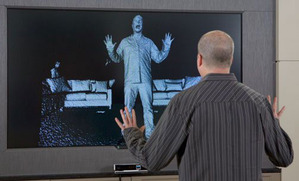
Voice commands will be a big part of interacting with the One. While we can assume you'll still be able to navigate via your controller or Smart Glass app, Yusef Mehdi, Microsoft’s senior vice president of interactive entertainment, demonstrated how to navigate the One using voice commands and gesture control with the updated Kinect sensor.

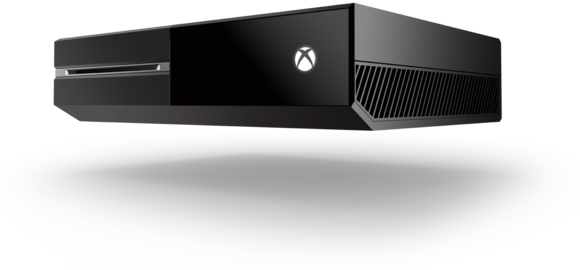
Xbox One
Users can instantly activate the One by uttering “Xbox On.” The Xbox will be able to differentiate the user’s voice and automatically remember where that particular user last left off in the dashboard.

More

Saturday, May 18, 2013

New Xbox more than a game console for Microsoft


SAN FRANCISCO/SEATTLE (Reuters) - Microsoft Corp is set to make a splash this week with the eagerly awaited unveiling of its new Xbox game console, eight years after the last version, as it seeks a larger share of the $65 billion a year global computer gaming industry.

But the small device faces some big competition from the PlayStation 4 by Sony Corp and the Wii U by Nintendo Co Ltd in a shifting market.

Gamers are gravitating to online play - suggesting the hey-day of console games are over - while Microsoft wants its sleek new toy to finally cross the bridge to the mainstream and become the family's entertainment center.

"Core gamers are very hungry for a new machine but the difference between 2005 and now is that the stakes are so much higher," said Ryan McCaffrey, executive editor at entertainment website IGN.com, harking back to Microsoft's last Xbox release. "The entire Xbox experiment from Microsoft was for it to be the center piece of your living room."


Tuesday, March 26, 2013

Why Windows Blue heralds the death of the desktop


PCWorld - Brace yourselves, faithful PC enthusiasts. You aren't going to like what I'm about to say. Heck, I don't really like what I'm about to say. In fact, I'm almost terrified to lay out my case in black and white. But that doesn't change the fact that it needs to be said. 

There's a very good chance that Microsoft will kill the desktop in Windows 9. No more Task Manager. No more File Explorer. No more legacy compatibility. It'll be 100 percent Live Tiles, 100 percent of the time. 

That day is still on the distant horizon, but it is coming. Indeed, if Windows Blue, the just-leaked update to Windows 8, shows us anything, it's that Microsoft is willing to de-emphasize desktop functionality in deference to the modern UI. 

A finger-friendly Windows

By now, everyone knows that Windows 8 (and its dumbed-down cousin, Windows RT) is Microsoft's answer to the massive success of smartphones and tablets. A touch-friendly interface! An app store! Bing Maps! Even an airplane mode! How mobile

The very introduction of the modern-style Start screen was a bad omen for desktop diehards, but the clouds truly darken when you consider how much of Windows core functionality is already being leeched away from the traditional desktop interface.  

Tuesday, March 19, 2013

Skype for Windows Phone 8 adds HD video support


New version of app offers clearer imaging and easier access to Skype contacts.

CNET - "Am I making myself clear?" takes on a whole new meaning now that Windows Phone 8 users can chat with their Skype contacts in high-definition video.

Out today, version 2.4 of Skype for Windows Phone 8 taps into the hardware acceleration in Microsoft's mobile OS to enable high-quality video calls.

Lower-end phones will deliver VGA video. But higher-end devices, such as the Nokia Lumia 920, HTC 8X, and Samsung Ativ S, can amp that up to 720P HD video, Skype said today in a blog about the new version.

More

Wednesday, February 20, 2013

Office showdown: Microsoft Office 365 vs. Google Apps


PCWorld - The war between Google and Microsoft is heating up. Each tech giant offers a productivity suite serving the essentials for serious work online: word processing, spreadsheets, email, and calendars. Should you ally with Google Apps for Business, or root for Microsoft's Office 365 for Small Business?

My experience with both brands' productivity tools reflects the workflows many small businesses face. In 2007, with staff scattered across several countries, my editorial company started using Google Apps for Business. It offered email, plus shared text documents and spreadsheets all under our company domain name and logo. Meanwhile, on the desktop, we used Microsoft Word and Excel, particularly for complex documents that we shared with clients.

If we were starting over today, we would seriously consider Microsoft's desktop-hybrid Office 365 for Small Business. For years Microsoft wasn't putting significant functionality online, but next week's release of Office 365 Small Business Premium is a big step forward. In addition, Microsoft offers the full, rich Word, Excel, PowerPoint and other applications.

Google and Microsoft each allow personal and business use of their online platform, as well as simultaneous logins to multiple accounts in different browser tabs. Beyond that, however, their platforms differ greatly in usability, functionality, and mobile support. Read on to discover the standout features and surprising weak points of each suite, with a focus on how key tools operate in a Web browser.

More

Tuesday, January 29, 2013

Microsoft Office 2013 Review

CNET -

CNET Editors' Rating

4.0 stars - Excellent

The good: Microsoft Office 365 Home Edition is a significant update that delivers all the familiar software, with a reinvented interface, tools that make common processes easier, and a cloud-friendly system that lets you work from anywhere.

The bad: The $100-a-year subscription will be hard for many people to swallow. The upgraded apps are not available for Mac at this time, and won't be for 12 to 18 months.

The bottom line: Familiar tools coupled with new features and a simplified and redesigned interface make Office 2013 well worth the paid upgrade.


Thursday, January 3, 2013

Microsoft starts E3 countdown, stirring rumors of next Xbox


PCWorld - Without saying much of anything, Microsoft has hinted that its next Xbox will break cover at the E3 trade show in June.


Larry “Major Nelson” Hryb, Microsoft’s director of programming for Xbox Live, has posted a countdown timer to E3 on his blog. Nothing accompanies the post except the headline (“Countdown to E3 2013”), a link to the official E3 Website, and the words “And it’s on…”

E3 is scheduled for June 11-13 in Los Angeles, though Microsoft usually holds a press conference the day before the show floor opens.

In fairness, Hryb could be counting down to anything—yet another version of Halo, perhaps, or the rumored “Xbox Surface” tablet. Or maybe he just woke up on this morning and realized he was really excited for a trade show that’s six months away.

More 

Thursday, December 13, 2012

Rumor Has It: Microsoft Office finally coming to iOS in 2013


CNET - Rumors have been swirling for a long time about the possibility of Microsoft's Office suite coming to iOS, but new leaks point to this happening sometime in the next year.

The biggest question we have about this rumor is: why hasn't this happened already?

Monday, December 3, 2012

How to test-drive Windows 8 for free in VirtualBox


PCWorld - Upgrading to a new operating system can be an intimidating undertaking that massively disrupts your daily workflow. And considering the dramatic interface changes introduced in Windows 8, you may not want to invest in Microsoft's latest OS without first giving it a thorough shakedown.

Fortunately, there's an easy, hassle-free way to test-drive Windows 8. Using a program called VirtualBox and the evaluation version of Windows 8 Enterprise, you can try out the new OS for free, without disturbing your current operating system. Read on—we’ll show you how.

Important considerations

For this project, you'll need to use the evaluation version of Windows 8 Enterprise, which you can download directly from Microsoft at the MSDN Evaluation Center website. There are a few things you should know about the evaluation edition, but you might want to start the download now—at 3.4GB, it will take a while.

Wording on the download page identifies it as “Windows 8 evaluation for developers,” but anyone who has a Microsoft account (such as a free Hotmail or Live account) can download the software and try it out. The download link is at the very bottom of the page. Simply select the 32- or 64-bit version of the operating system, log in, and fill out a brief questionnaire. Just like that, you’re downloading Windows 8!

More

Tuesday, November 20, 2012

Nex-Gen Xbox to have Blu-ray, AR glasses, broadcast DVR, says report


PCWorld - Microsoft's next Xbox console will have all sorts of bells and whistles, including Blu-ray, broadcast DVR, and—eventually—augmented-reality glasses, according to one report.

Xbox World, a magazine published in the United Kingdom, has published a long feature article on what it believes Microsoft's next console will be like, citing “industry experts and Microsoft's own leaky boat.” The report is based in large part on leaked planning documents that surfaced in June—eventually taken down at the request of a law firm that represents Microsoft—but with additional comments from industry sources.
The magazine claims that the next Xbox—often referred to as “Xbox 720,” but possibly just dubbed “Xbox”—will launch in November 2013, and top developers are already making games for it.

Here's a rundown of the features that Xbox World expects to see in Microsoft's next gaming console.

Keep in mind that all of this is rumor or speculation, and Microsoft hasn't confirmed any of it:
  • Hardware may include four hardware cores, 8GB of RAM, four USB spots (two in front, two in back), and a removable hard drive.
  • A “Kinect 2.0” may detect subtle finger movements and track up to four players in a single room.
  • Augmented reality glasses could work with Kinect to create virtual reality in your living room. Hello, Holodeck.
  • To further enhance the virtual reality vibe, the next Xbox could have 3D sound to project audio to specific parts of a room.
  • Microsoft may finally embrace Blu-ray in its next Xbox, but may eventually ship a slimmer console that skips optical discs altogether, possibly around 2015.
  • Rumors hint at a traditional Xbox controller, but with a touch screen or programmable buttons. Xbox World's report adds some speculation from experts, but the controller still seems like major question mark.
More

Tuesday, November 6, 2012

Xbox Surface gaming tablet reportedly in the works

The tablet would have a smaller, 7-inch display and would focus largely on gaming, according to The Verge. It might even run its own version of Windows.


CNET - Microsoft is working on an Xbox Surface tablet, according to The Verge.
The device, as the name implies, would feature a 7-inch display and focus largely on gaming, The Verge reported, citing unnamed sources.

The Xbox Surface would follow its larger brother, the recently launched Surface, which features a 10-inch display and runs a stripped-down version of Windows called Windows RT. The Xbox Surface would reportedly run on its own version of Windows as well.

Microsoft declined to comment. "We don't comment on rumors or speculation," according to a company representative. 

More

Monday, October 15, 2012

Xbox: The new face of 'entertainment' at Microsoft, beyond just video games


Engadget - The most striking takeaway from a recent meeting I had with Xbox Music GM Jerry Johnson wasn't the Spotify-like service he was in New York City to show off, but rather what he said about a much larger internal change at Microsoft. Having been relegated to the world of video games for the past decade, Microsoft is opening up its Xbox branding to a larger world of media. "'Xbox' is actually going from thinking about gaming in a device to being the entertainment face for all of Microsoft," Johnson said -- a major change from the Xbox name's place as a stand-in for "the Halo and Gears of War box," trotted out once or twice annually by lower level execs from the Washington-based software giant. "That's what the company -- all the way up to Steve Ballmer -- have gotten behind. That's why you're gonna see movies on Windows 8 slates, you're gonna see music, and it's gonna be branded as 'Xbox.'," he explained. This naming convention carries to Windows Phone 8 and Windows 8 RT as well -- all post-Windows 7 Microsoft devices (and Xbox 360) will refer to music and video libraries as "Xbox Music" and "Xbox Video," respectively.

But to many, that shift could be confusing. Isn't "Xbox" that thing in the living room? When "Xbox Music" shows up on Windows 8 devices later this month, will your average user understand that, no, they don't have to own an Xbox to listen to the music therein? Johnson's not worried about that potential reality. "The brand has continued to evolve," he argued. "I don't think it's left anything behind, I think it's broadened the number of people who engage in these type of experiences. And Microsoft as a company I think recognizes that, and it's more about Xbox meaning 'entertainment.'"

More

Wednesday, August 1, 2012

Microsoft Outlook.Com: A Getting-Started Guide


PCWorld - Hotmail users and newbies are flocking in droves to Outlook.com, Microsoft’s latest Webmail overhaul that will eventually replace Hotmail. Less than 24 hours after Microsoft rolled out Outlook.com, one million people were already using the service, according to an official tweet from Microsoft. The new Outlook continues Microsoft’s overhaul of all its Web properties to the new touch-centric Metro feel -- the same look that’s coming to the Windows 8 Start Screen and is already on Windows Phone.

[RELATED: Analysts: At First Pass, Outlook.com Looks Underwhelming]

Launched in 1996, and bought by Microsoft in 1997, Hotmail was one of the earliest free Webmail services and became the first e-mail address for millions of people, perhaps rivaled only by AOL Mail. But what was once new and exciting in the late 1990s became stagnant and less innovative by the early 2000s. Around 2004, Google’s Gmail was the hot new e-mail service, while Hotmail appeared dated. That lack of trendiness, however, did not cause Hotmail to bleed users. In fact, it was only recently that Gmail finally surpassed Hotmail, reaching 425 million active users in June, while Hotmail’s last reported user base hovered around 360 million.

Microsoft’s Outlook.com overhaul comes just in time to help Hotmail/Outlook try to regain its position as the world’s top Webmail service. It’s not clear when Hotmail will be completely absorbed into the new Outlook.com, so longtime Hotmail users resistant to change can stick with the older Webmail service for now.

But if you’re interested in getting started with Outlook.com today, here’s what you need to know whether you’re a Hotmail veteran or new to Microsoft Webmail.

Microsoft Outlook.Com: A Getting-Started Guide

If you already have a Hotmail address or Microsoft account, just sign in to Outlook.com using your current credentials and you will automatically switch over to the new look. New users can also sign up for an account at the Outlook.com start page.

More

Wednesday, July 18, 2012

Microsoft Office 2013 Preview: Hands On


PCWorld - Office 2013 is touchscreen ready, cloud friendly, and adds bold new twists to the Microsoft Office franchise. On Monday Microsoft CEO Steve Ballmer outlined what he said was the "biggest most ambitious Office" update to date.

For the desktop Office 2013 delivers a host of smart updates to Word, Outlook, and Excel. But where Office 2013 shines is embracing the mobile world and the cloud with deep integration with Microsoft’s cloud service SkyDrive and collaboration - integrating its recent acquisitions Skype and Yammer. Windows 8, and the upcoming release of Microsoft Surface tablets and Windows Phone 8 smartphones, also play a huge roles in coloring Office 2013 with new features.

Ahead of Microsoft's big news Monday Microsoft provided PCWorld with two Windows 8 tablets (no, not the Surface) and access to the customer preview versions of both Office 2013 and the cloud-based Office 365.

Here is a look at how the software suite runs on laptop, desktop touchscreen, and tablet platforms.
In this story, PCWorld Senior Editor Michael Brown first gives his impressions of working with Office 2013 and 365 on a laptop and a desktop PC. Contributing editor Tony Bradley then writes about his tests of the new products on a tablet PC.

Office 2013, Office 365 on a Laptop and a Desktop PC

 --------

I spent most of my time with Word and Excel on a laptop and on a desktop all-in-one equipped with a touchscreen. As expected, Microsoft is tying Office 2013 and Office 365 tightly to its SkyDrive cloud-storage service.

You're free to use other services, but I suspect that this integration will lure plenty of Office users away from their paid accounts on Google, Dropbox, and SugarSync. If you buy a version of Microsoft's new software and sign up for a Microsoft Live account, you'll get 20GB of free storage in SkyDrive.

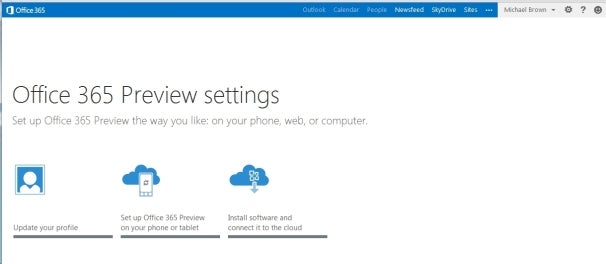
Ofiice 365 Preview: settings screen 


The Ofiice 365 Preview settings screen.

Both Office 2013 and Office 365 offer largely the same user experience, but Microsoft is clearly steering its customers toward the cloud-based version. The company is also marketing Office 365 to consumers for the first time, rather than strictly to businesses.    More
 

Wednesday, July 11, 2012

Microsoft Urges Users to Shut Down Windows Gadgets or Risk Attack

PCWorld - Rather than fix vulnerabilities with Gadgets and the Sidebar in Windows Vista and Windows 7, Microsoft is advising users to disable the features altogether.

Gadgets and Sidebar allow users to add visual information and small programs to the Windows desktop, including clock faces, music players and RSS feed readers.

Microsoft Urges Users to Shut Down Windows Gadgets or Risk Attack

Now, Microsoft has issued a Fix It solution to disable Gadgets and the Sidebar. These features, if left enabled, may allow the execution of arbitrary code, and could allow attackers to take complete control of a person’s system, Microsoft warns in a Knowledge Base article.

As Computerworld notes, researchers are getting ready to disclose Gadget vulnerabilities at the Black Hat conference this month. Microsoft describes the fix as a temporary workaround, so it's possible that the company will release a proper fix, but Microsoft hasn't said either way.     More

Thursday, June 21, 2012

Steve Ballmer Memo Hints at New Microsoft Devices and Services. Also, Pics of Surface Tablet


Mashable - Shortly after he presented Surface to the world, Microsoft’s CEO Steve Ballmer sent a memo to employees, hinting at new devices and services from the company.

In the memo, Ballmer praises some of the work Microsoft’s done in the past year and claims he’s “incredibly optimistic” of what’s ahead for the company.

He drops some interesting tidbits about Surface, calling it “a new family of computing devices from Microsoft.” This wasn’t hard to guess, but it’s obvious Microsoft doesn’t plan on stopping at just one tablet. There is going to be more than one Surface — unfortunately, Ballmer doesn’t say much about when that might happen.   More

Taking the Tablet to New Heights 

Microsoft thinks Surface can redefine the tablet with dual USB ports, thin-yet-sturdy construction and a cover that reveals a fully functional keyboard complete with trackpad.


Ultrabook? No. Ultra thin? Yes.

The Surface's Windows RT version is just 9.3 millimeters thick, while the Windows 8 Pro version measures 13.5 millimeters.